
Does a MacBook have a Dynamic Island?
For years the answer was a flat no. That changed in late 2026, so here is where Apple actually stands as of 13 November 2026:
- The new MacBook Pro has one. On 28 October 2026 Apple announced 14-inch and 16-inch MacBook Pro models with a PROLED XDR display and touch. Apple says the Dynamic Island "now comes to Mac, serving as the home for Spotlight, Live Activities, and Siri AI." Prices start at $2,899 and availability began on 6 November.
- macOS 26 Tahoe shows iPhone Live Activities in the menu bar. A sports score, workout, ride or delivery running on a nearby iPhone appears in the Mac's menu bar and expands with a click. It needs the same Apple Account on both devices, with Bluetooth and Wi-Fi on.
- macOS 27.3 is bringing Mac Live Activities to other Macs. In the developer beta released in early November, Apple silicon Macs without a Dynamic Island show Live Activities as small ovals in the menu bar, starting with Apple Music, Clock, Voice Memos and screen recording. Third-party apps can add their own. MacRumors expects the release in December, and beta features can change before then.
So if you have a MacBook Air, an older MacBook Pro or a desktop Mac, Apple's answer is a few ovals in the menu bar. The notch itself stays a black cutout. That gap is what notch apps fill, and they've been doing it since well before Apple's own version arrived.
What a Dynamic Island app for Mac actually does
A notch app sits invisibly around the camera housing. Most of them work in three states:
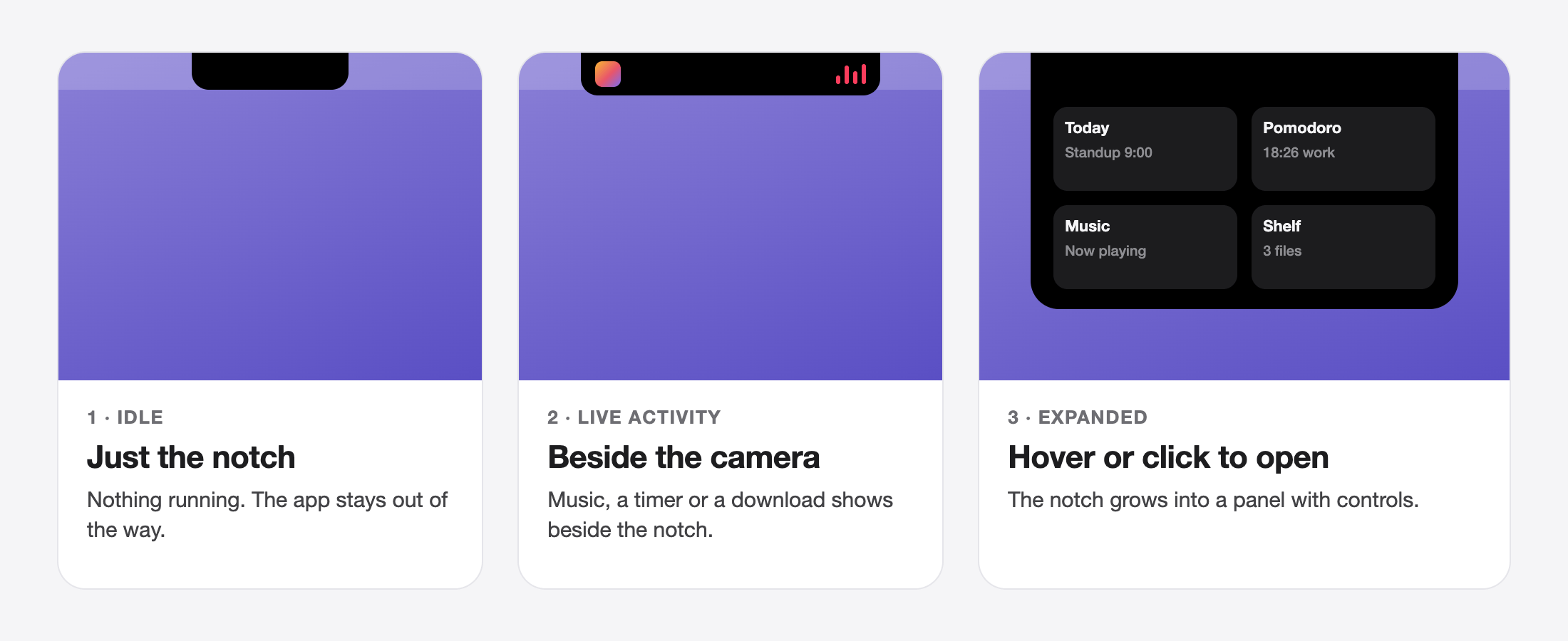
What shows up in those states depends on the app, but these are the common building blocks:
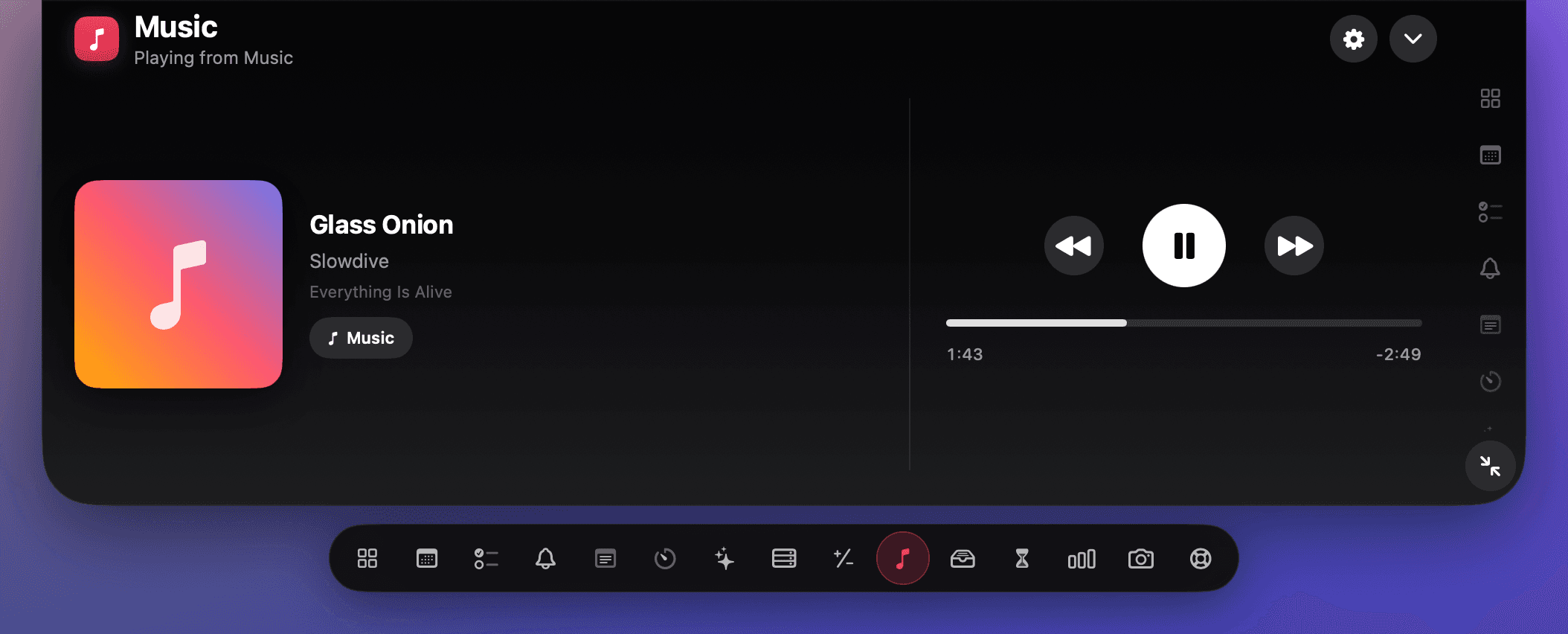
- Now playing. Album art beside the notch while music plays, with play, pause and skip when you open it.
- Timers. A Pomodoro or countdown ticking in the notch so you see it in any app.
- Charging and battery. A short flash when you plug in or the battery runs low.
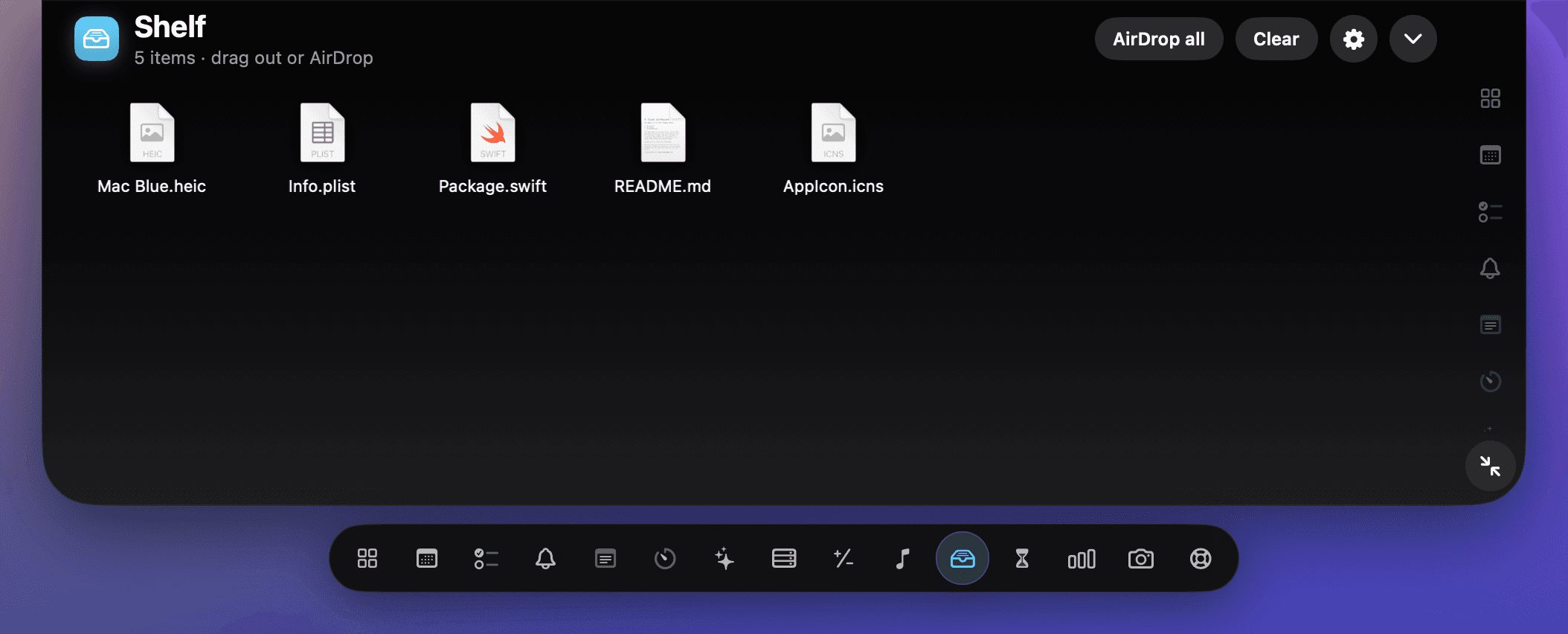
- A file shelf. Drag files onto the notch to park them, then drag them out later or AirDrop them.
- Alerts. Meetings, finished downloads and, in some apps, notifications drop down from the notch.
- HUD replacement. Some apps, including Boring Notch and Notchy, replace the volume and brightness pop-ups with a version in the notch.
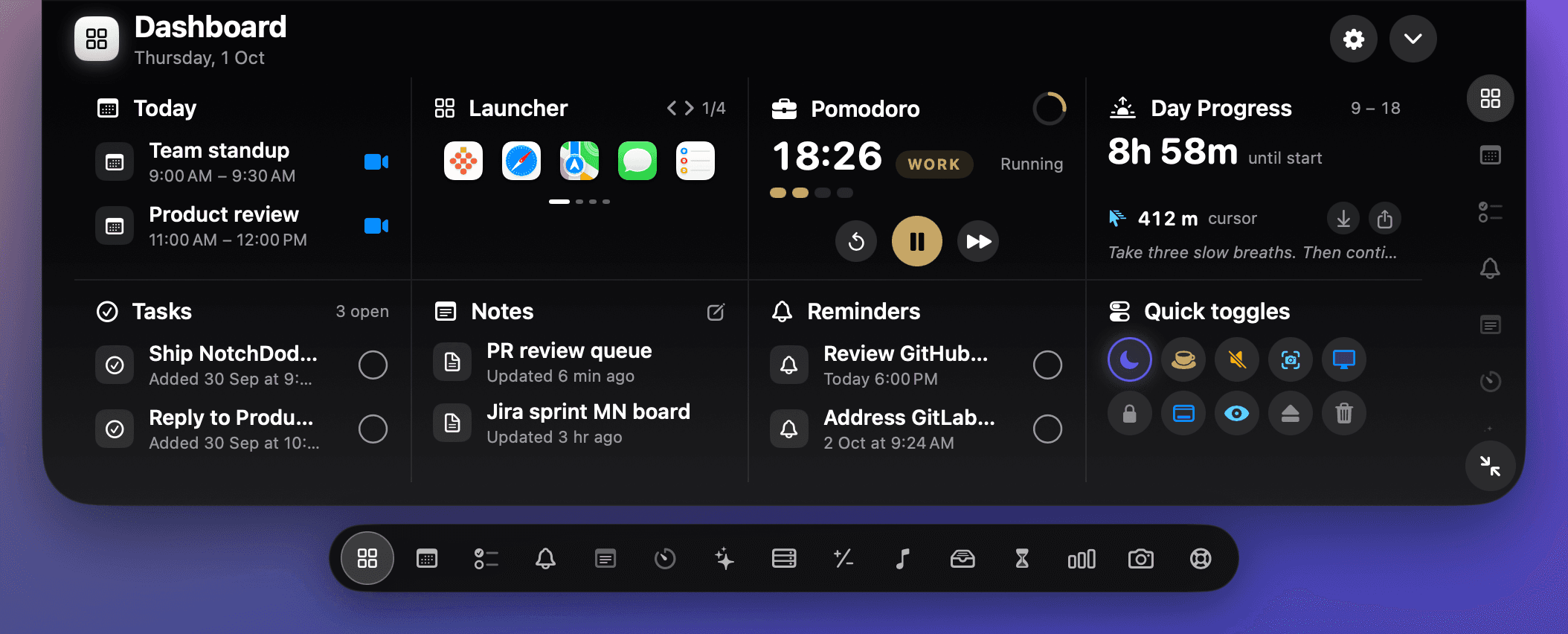
In NotchDodo, the live activities are music, Pomodoro and timers, a meeting countdown, charging and low battery, browser downloads, and AI coding agents such as Claude Code. Hover and you get a dashboard of eight tiles you choose yourself: today's meetings with a Join button, tasks, notes, reminders, a Pomodoro timer, quick toggles and more. It doesn't replace the volume and brightness pop-ups.
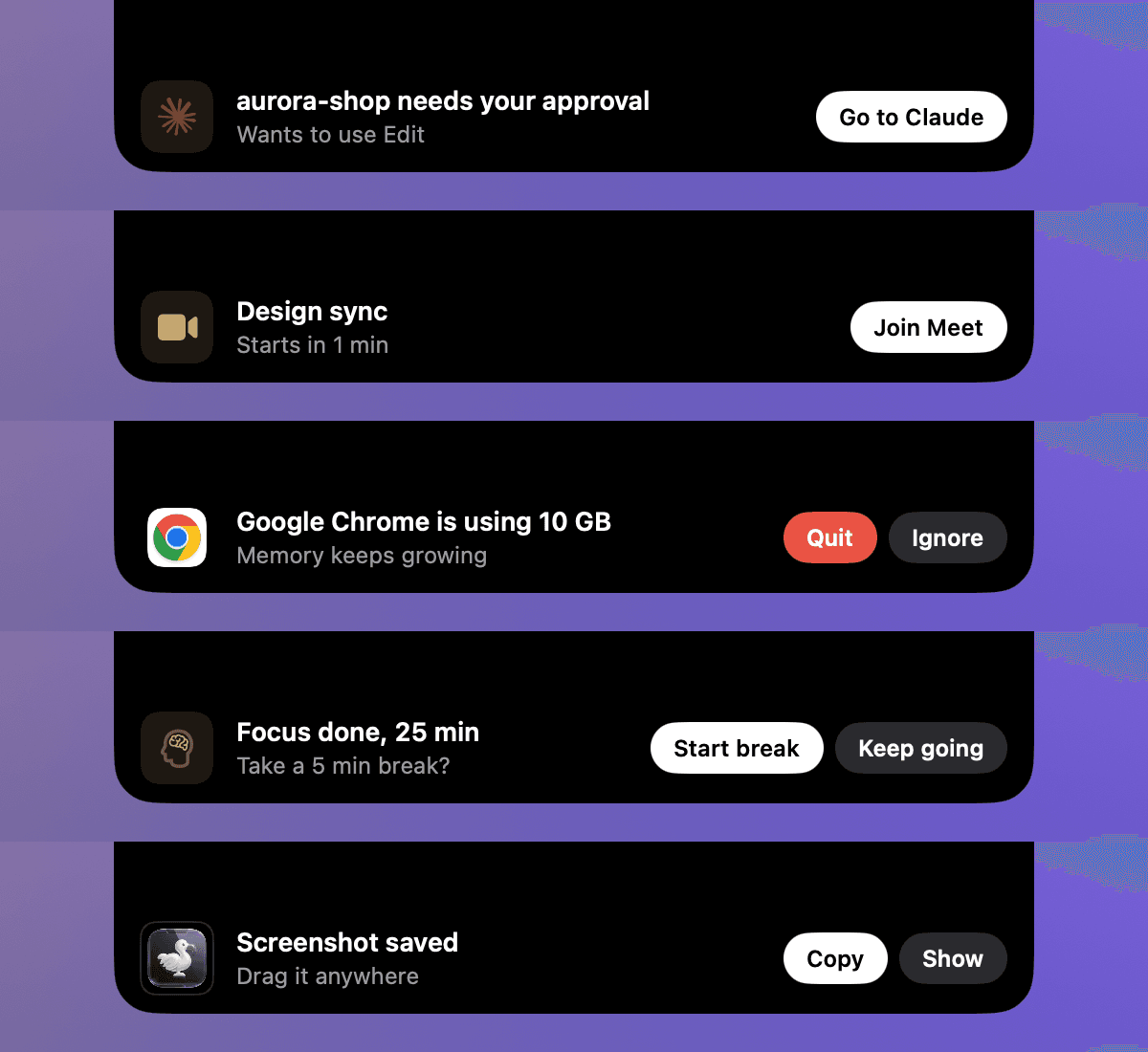
When something needs you, the notch grows into a banner with a button you can press right there, such as Join for a meeting or Quit for an app that is eating memory.
What you need: notch, no notch and external displays
Apple builds the camera housing into the MacBook Air with a Liquid Retina display and the MacBook Pro with a Liquid Retina XDR display. On those, a notch app wraps itself around the real cutout. On everything else, it depends on the app:
- NotchDodo draws a simulated notch at the top centre of the screen on Macs without one. It needs macOS 14 Sonoma or later and Apple silicon.
- Notchy shows the same island as a floating pill on MacBook Air, iMac, Mac mini, Mac Studio and external displays, from macOS 13 Ventura.
- NotchNook shows a small handle at the top of screens without a notch, one per display. Its Classic plan also runs on Intel Macs.
- Boring Notch runs on Apple silicon and Intel from macOS 14. Its README doesn't say how it behaves on screens without a notch.
- Atoll needs a MacBook with a notch.
Got the new MacBook Pro with Apple's own Dynamic Island? You already have the real thing for Live Activities. We haven't tested third-party notch apps on that model, so check with the developer before you buy one for it.
How to get a Dynamic Island on your Mac, step by step
We'll use NotchDodo because we make it and know every step. The flow is close to identical for any notch app you download from the web.
- Download the disk image. Use the link in your purchase email or the download button on the install page. It lands in Downloads.
- Drag NotchDodo to Applications. Open the disk image, drag the app onto the Applications folder next to it, then eject the disk image.
- Open it once from Applications. Double-click it. If it opens, skip to step 5.
- If macOS says it could not verify NotchDodo, click Done, open System Settings → Privacy & Security, scroll to Security and click Open Anyway next to "NotchDodo was blocked to protect your Mac". Confirm with your password or Touch ID, then click Open. This appears because the current build isn't notarised with Apple yet. You do it once per version.
- Paste your licence key. A black panel hangs from the notch and asks for it the first time. It needs the internet once, and one key covers 2 Macs.
- Hover the notch. It opens after a short delay (0.2 seconds by default, adjustable in Settings). Clicking the notch opens it too. Move away, click outside or press Esc to close it.
- Make it yours. Click the gear on the Dashboard to pick its eight tiles, turn on Launch at login in Settings, and give the notch or any tool a keyboard shortcut if you like.
If you prefer Terminal for step 4, this clears the quarantine flag and does the same thing:
xattr -d com.apple.quarantine /Applications/NotchDodo.appWhile another app is using your camera, NotchDodo stops opening on hover so reaching for the top of the screen on a call doesn't cover it; click the notch instead. Music works with Apple Music and the Spotify desktop app, and the Shelf takes files you drop on the notch plus, if you want, finished browser downloads and new screenshots.
Free Dynamic Island apps for Mac
Checked on 13 November 2026 against each project's own page:
- Boring Notch: free and open source (GPL-3.0), macOS 14 or later on Apple silicon or Intel. Music controls with a visualiser, calendar, a file shelf with AirDrop and replacement volume and brightness HUDs. The developer has no Apple Developer account, so macOS warns on first launch. Installing with Homebrew avoids that, according to the README:
brew install --cask TheBoredTeam/boring-notch/boring-notch- Atoll: free under GPL v3, macOS 14 or later, notched MacBooks only. It adds live activities for playback, Focus, screen recording, downloads and charging, plus lock screen widgets, system stats and clipboard history.
- Apple's own: on macOS 26 you already get iPhone Live Activities in the menu bar, and macOS 27.3 adds Mac ones when it ships. No notch panel, but nothing to install.
Paid options
Paid apps tend to be signed, supported and more polished. Briefly, with prices from each app's site on 13 November 2026:
- NotchDodo: $9.99 one-time, 2 Macs, 14-day refund. Built around your working day and AI coding agents, with 18 tools including a clipboard manager and a Claude Code usage tracker.
- NotchNook: monthly or lifetime plans, 2 Macs, a free 48-hour trial with no card. See NotchDodo vs NotchNook.
- Notchy: $24.99 one-time for one Mac, 7-day trial. A very long feature list including HUDs and lyrics.
- Alcove: $12.99, macOS 15 or later. Known for polished animation, notifications and live activities.
For prices, features and who each one suits side by side, read our best notch apps for Mac comparison, or NotchDodo vs Boring Notch if you're deciding between free and paid.
Apple's version vs notch apps
| New MacBook Pro | macOS 27.3 menu bar | Boring Notch | NotchDodo | |
|---|---|---|---|---|
| Cost | From $2,899 (the laptop) | Free update, in beta | Free | $9.99 one-time |
| Works on existing MacBooks | No | Apple silicon Macs | Yes, incl. Intel | Yes, Apple silicon |
| Uses the notch area | Yes | No, menu bar ovals | Yes | Yes |
| Macs without a notch | Not applicable | Yes | Not stated | Simulated notch |
| File shelf / AirDrop | Not announced | No | Yes | Yes |
| Volume / brightness HUD | Not announced | No | Yes | No |
| Calendar, tasks, timers | Via Live Activities | Clock app activities | Calendar | Yes, plus 15 more tools |
If you just want music and a nicer volume pop-up for free, Boring Notch is a good start. If you'd like the notch to run your day, a paid app does more. And if you're happy with a few ovals in the menu bar, wait for macOS 27.3.
Privacy and permissions
A notch app can ask for a lot, because each feature touches a different part of macOS. A good one asks only when you first use the feature. Here is what NotchDodo asks for and why:
- Calendars and Reminders: to show and complete today's events and reminders. Asked the first time you open those tools.
- Automation (Apple Events): to control playback in Music and Spotify.
- Camera: for the Mirror tool, on first use. The camera stops when the notch closes.
- Downloads, Desktop and Documents folders: so finished downloads and new screenshots can land on the Shelf.
- Accessibility: for the Menu Bar tool that reveals icons hidden behind the notch, and to paste clipboard items straight into the app you're in.
There's no account. Tasks, notes, the Shelf, screen time and AI usage stay on your Mac, and the app only goes online for things like checking your licence and updates. Whatever app you pick, it's worth reviewing System Settings → Privacy & Security afterwards and switching off anything you don't use.
Troubleshooting
Nothing appears at the notch
- Check the app is actually running. NotchDodo has no Dock icon, so look for it in Activity Monitor, or open it again from Applications.
- If macOS blocked it on first launch, finish the Open Anyway step.
- Quit any other notch app. Two of them fight over the same space.
- Raise or lower the hover delay in Settings, or just click the notch.
It disappears in full-screen apps
NotchDodo has a Hide in full-screen apps setting, off by default. If the island vanishes when you watch a video full screen, check whether you switched it on. Other apps have similar settings.
It's on the wrong display
With a MacBook open next to an external monitor, NotchDodo stays on the built-in screen, where the real notch is. Close the lid and use the external display alone, and it draws its simulated notch on your main display instead, and moves back when you open the lid. If you never want the simulated one, turn off Show a simulated notch on Macs without one in Settings.
Menu bar icons are hidden behind the notch
That's macOS, not the notch app: when the menu bar is full, icons slide behind the camera. Apple's fix is per app: select it in Applications, press Command-I and tick Scale to fit below built-in camera. NotchDodo's Menu Bar tool lists every icon, marks the hidden ones and opens any of them with a click.
More guides
- Claude Code usage limits explained: the 5-hour window, weekly limits, and how to check what's left: How Claude Code usage limits work on Pro, Max and Ultra: the 5-hour session window, the weekly limit and when each resets, what happens at the limit, and how to check what's left with /usage, claude.ai, ccusage or NotchDodo.
- Codex usage limits: how to check what's left and when it resets: How Codex usage limits work on ChatGPT Plus, Pro and Business: the 5-hour and weekly windows, how to check them with /status, and what to do when you hit one.
- Menu bar icons hidden behind the MacBook notch? 5 ways to get them back: Why Mac menu bar icons disappear behind the MacBook notch and 5 ways to get them back: Command-drag and Menu Bar settings, a spacing command, macOS 27's built-in button, Bartender or free managers like Ice and Thaw, and NotchDodo.
- How to keep your MacBook awake with the lid closed (and when you shouldn't): Keep a MacBook awake with the lid closed: Apple's closed-display (clamshell) mode with an external monitor, pmset disablesleep, Amphetamine, why caffeinate can't do it, and the safer lid-open way to run Claude Code or scripts overnight.
- How to stop your Mac sleeping while a download or script runs: Four ways to keep a Mac awake until a download, backup or script finishes: a System Settings switch, the caffeinate command, free apps like Amphetamine, and NotchDodo. Plus what to do about the lid.
- Best notch apps for Mac in 2026: 8 apps compared: The best MacBook notch apps in 2026 compared on price, features and who each is for: NotchDodo, Droppy, Notchy, Boring Notch, Alcove, NotchNook, DynamicLake and Seam.
- Why is my Mac fan so loud? How to find the app and check CPU temperature: Find the app making your Mac fan loud with Activity Monitor or Terminal, check CPU temperature and fan speed on Apple silicon and Intel, and quiet it down.
- How to get notified when Claude Code needs your approval on Mac: Three ways to get an alert when Claude Code is waiting for permission or your next prompt on a Mac: the terminal bell, a Claude Code hook with a native macOS notification, and an alert in your MacBook notch.
- Claude Code usage tracker for Mac: See Claude Code tokens, estimated cost and your 5-hour window in the MacBook notch. Reads local logs, uploads nothing. Codex and Gemini CLI too.
- NotchNook alternative: NotchDodo vs NotchNook: An honest side-by-side of the two notch apps: tools, live activities, AI agent tracking, privacy and price.
- NotchDodo vs Boring Notch: What you get with the free, open source Boring Notch and what NotchDodo adds on top: calendar, Pomodoro, Claude Code alerts and more.
Sources
- Apple Newsroom: Apple unveils groundbreaking MacBook Pro with PROLED XDR Display (28 October 2026)
- Apple: All New Features, macOS Tahoe (PDF), Live Activities and footnote 8
- MacRumors: macOS 27.3 brings Live Activities to Macs without Dynamic Island (4 November 2026)
- Macworld: You don't need a $3,000 MacBook to get Live Activities in your menu bar
- Apple Support: Adjust an app's settings to appear below the camera area on your MacBook Air or MacBook Pro
- Boring Notch on GitHub · Atoll on GitHub
- Notchy · NotchNook · Alcove
Mac, MacBook, macOS and Dynamic Island are trademarks of Apple Inc. Other app names belong to their owners. NotchDodo is an independent app and is not affiliated with Apple or with any app listed here.