
/usage in Claude Code or open claude.ai → Settings → Usage.How the Claude Code 5-hour limit works
If you sign in to Claude Code with a Claude subscription, you aren't billed per token. Instead you get a usage allowance, and the shorter of the two allowances is the session limit, usually called the 5-hour limit. Anthropic's help center puts it simply: the five-hour period starts with your first message and resets five hours later.
A few things follow from that, and they trip people up:
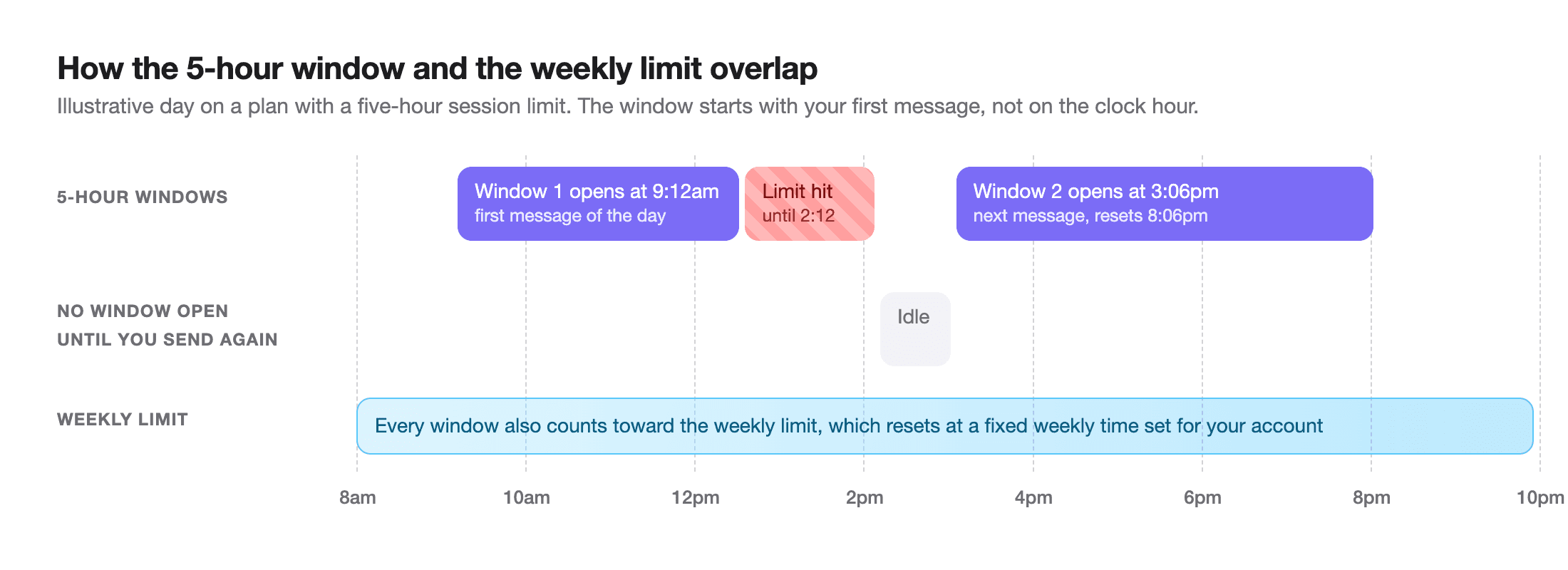
- It isn't a fixed clock. Send your first message at 9:12am and that window resets at 2:12pm. Nothing is running before you start, so a quiet morning doesn't "use up" anything.
- It's shared. Anthropic says usage across claude.ai, Claude Code and Claude Desktop all counts towards the same limit. A long research chat in the browser eats into the same window as your terminal.
- Work isn't measured in messages. Usage depends on conversation length and complexity, the features and tools you use, the model, and the effort level. Claude Code sends your whole conversation with every request, so one question in a session that's been open all day costs far more than the same question in a fresh one.
How the Claude Code weekly limit works
Underneath the 5-hour window there's a weekly limit that applies across all models. Unlike the session window, it doesn't start when you do: weekly limits reset at a fixed time each week that is assigned to your account, and that time stays the same however you use Claude. You can see it under Settings → Usage.
Claude Code's docs point out that usage counts against the session and weekly allowances at the same time, so one burst of heavy work, such as fanning a big task out to many agents, can use up the week before the 5-hour window even resets. On Max and Ultra there is also a separate weekly limit for Fable models. Claude Code's error reference also lists model-family limits, "You've hit your Opus limit" and "You've hit your Sonnet limit", which only block that one family.
Claude Pro vs Max vs Ultra: Claude Code limits by plan
Anthropic describes its plans relative to Pro rather than in messages or tokens. Here is what each plan gets, in Anthropic's own terms. Prices are US web prices; mobile pricing can differ.
| Plan | Price | 5-hour session limit | Weekly limit |
|---|---|---|---|
| Pro | $20/month | Yes | Yes, across all models |
| Max (the 5x tier) | $100/month | Yes, 5x Pro's usage every five hours | 5x Pro, plus a separate Fable limit |
| Ultra (formerly Max 20x) | $200/month | None for verified accounts | 10x Pro, plus a separate Fable limit |
| Team / Enterprise | Per seat | Rolling five-hour window per seat | Weekly window; size depends on Standard or Premium seat |
| API key / Console | Pay per token | No plan limits | No plan limits; API rate and spend limits apply |
Two notes. First, Anthropic's help center says the Max 20x plan is now called Ultra and existing subscribers moved over automatically at the same price. New Ultra accounts keep a temporary limit until Anthropic verifies them from account and payment history; if there's no current session bar in Settings → Usage, you're verified. Second, Anthropic doesn't publish how many prompts or tokens any plan gets. Figures you see quoted online, like "40 prompts per 5 hours", are other people's estimates, often from older plan versions.
One more trap: if the ANTHROPIC_API_KEY environment variable is set, Claude Code authenticates with that key instead of your subscription, and you pay API rates. Anthropic's fix is to run claude logout, then claude login with your plan credentials only.
How to check your Claude Code usage
1. The /usage command
The quickest check is built in. At the Claude Code prompt, type:
/usageAccording to Anthropic's docs, on a Pro, Max, Ultra, Team or Enterprise plan this shows your plan usage bars with reset times, activity stats, and a breakdown of what counts against your limits: the share used by skills, subagents, plugins and individual MCP servers, and suggestions such as trimming a large CLAUDE.md. Press d or w to switch between the last 24 hours and the last 7 days. /cost and /stats are aliases, and /usage runs immediately even while Claude is busy.
The dollar figure in the Session block at the top is computed locally at API list prices. Anthropic notes it's meant for API users; on a subscription it isn't what you pay. /status is different: it shows your version, model, account and connectivity, which is handy for confirming you're signed in with your subscription and not an API key.
2. claude.ai Settings → Usage
On the web, open claude.ai, then Settings → Usage. Anthropic says this page shows your current session and the time remaining, plus your next weekly reset. It's also where you turn usage credits on or off. In the Claude desktop app, the usage ring under the prompt box opens the same plan usage.
3. A status line that never goes away
Claude Code can run a script to draw its status line, and for Pro, Max and Ultra subscribers it passes in rate_limits.five_hour and rate_limits.seven_day, each with a used_percentage and a resets_at time. The fields appear after the first response in a session. A minimal version of the script from Anthropic's docs (it needs jq):
#!/bin/bash
# ~/.claude/statusline.sh: show 5-hour and weekly usage in Claude Code's status line
input=$(cat)
FIVE_H=$(echo "$input" | jq -r '.rate_limits.five_hour.used_percentage // empty')
WEEK=$(echo "$input" | jq -r '.rate_limits.seven_day.used_percentage // empty')
LIMITS=""
[ -n "$FIVE_H" ] && LIMITS="5h: $(printf '%.0f' "$FIVE_H")%"
[ -n "$WEEK" ] && LIMITS="${LIMITS:+$LIMITS }7d: $(printf '%.0f' "$WEEK")%"
echo "${LIMITS:-limits not loaded yet}"
Make it executable with chmod +x ~/.claude/statusline.sh and point Claude Code at it in ~/.claude/settings.json:
{
  "statusLine": {
    "type": "command",
    "command": "~/.claude/statusline.sh"
  }
}
What happens when you hit the limit
Claude Code warns you first, with a line such as You've used 85% of your session limit · resets 3:45pm. When the allowance runs out, it blocks new requests until the reset time in the message. Your options, from Anthropic's docs:
- Wait, and let it continue on its own. In an interactive session signed in with a subscription, Claude Code v2.1.234 and later waits in the open session and picks the task up shortly after the reset. Keep the terminal open; press Esc to cancel.
/rate-limit-optionsshows the choices. - Turn on usage credits. Run
/usage-credits(it was called/extra-usage) on Pro, Max or Ultra. Work continues past the limit at standard API rates, billed separately from your plan, until your balance or monthly spend limit runs out. On Team and Enterprise it sends a request to your admin. - Switch model, for model limits only. After an Opus or Sonnet limit,
/modelto another family keeps you going. It won't help with the session or weekly limit. - Upgrade. Pro to Max, or Max to Ultra. Anthropic says upgrades take effect immediately.
- Use an API key from the Claude Console and pay per token instead.
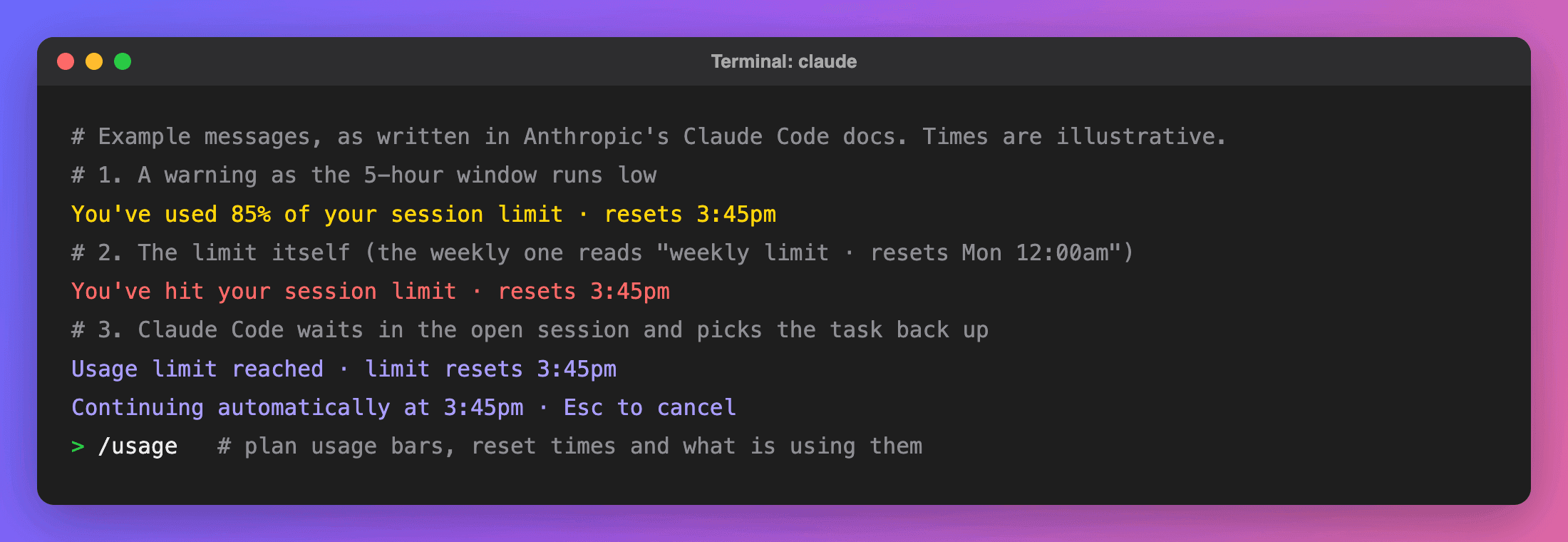
Anthropic is also rolling out a small "wrap-up" allowance: if you hit the five-hour limit mid-response, Claude Code may finish the current step and show Usage limit reached · wrapping up. On Pro that can happen up to once per weekly period; on Max, each time you reach a five-hour limit. It still counts towards your weekly limit.
ccusage: usage from your local logs
ccusage is a popular open-source, MIT-licensed command-line tool that reads the session logs Claude Code saves on your machine and turns them into reports. Nothing to install if you have Node:
npx ccusage@latest            # daily report
npx ccusage@latest blocks     # usage grouped into 5-hour blocks
npx ccusage@latest blocks --active   # the current block, with burn rate and projection
The blocks report groups your usage into 5-hour blocks and, for the active one, shows a burn rate in tokens per minute and a projected total if you keep going at that pace. Add --token-limit max to measure the current block against your biggest past block:
npx ccusage@latest blocks --active --token-limit maxTwo caveats. ccusage estimates cost at API prices and only sees logs on this Mac, so usage on claude.ai or another computer is invisible to it. And its blocks are an approximation built from timestamps, not Anthropic's meter, so use it to understand how fast you're burning through a window, and /usage to know how much is actually left. Also note that Claude Code deletes local session data older than 30 days by default (the cleanupPeriodDays setting), which limits how far back any log-based tool can see. The old blocks --live monitor was removed in ccusage v18 in favour of its status line command.
Watch the 5-hour window from your notch
Running /usage or npx ccusage means stopping to ask. NotchDodo is a Mac app that turns the MacBook notch into a small dashboard, and its AI Usage page reads the same local logs so the numbers are just there. What it shows:
- Your current 5-hour window: tokens used against a budget, burn rate per minute, and the reset time, with a bar that turns orange at 80% and red at 100%. Like ccusage, a window opens at the hour of your first message. The budget is set in Settings, or on auto it uses your biggest past window (at least 1M tokens).
- Each agent session: project, branch, model, running or waiting, active time, messages, tokens and estimated cost.
- Today and the last 7 days, in tokens and estimated cost at API list prices.
- Warnings in the notch once per window at 80% and at the limit, and a live activity while an agent runs.
- Codex and Gemini CLI sessions too. Gemini counts towards today and the chart but not the 5-hour window, since Google doesn't limit usage that way.
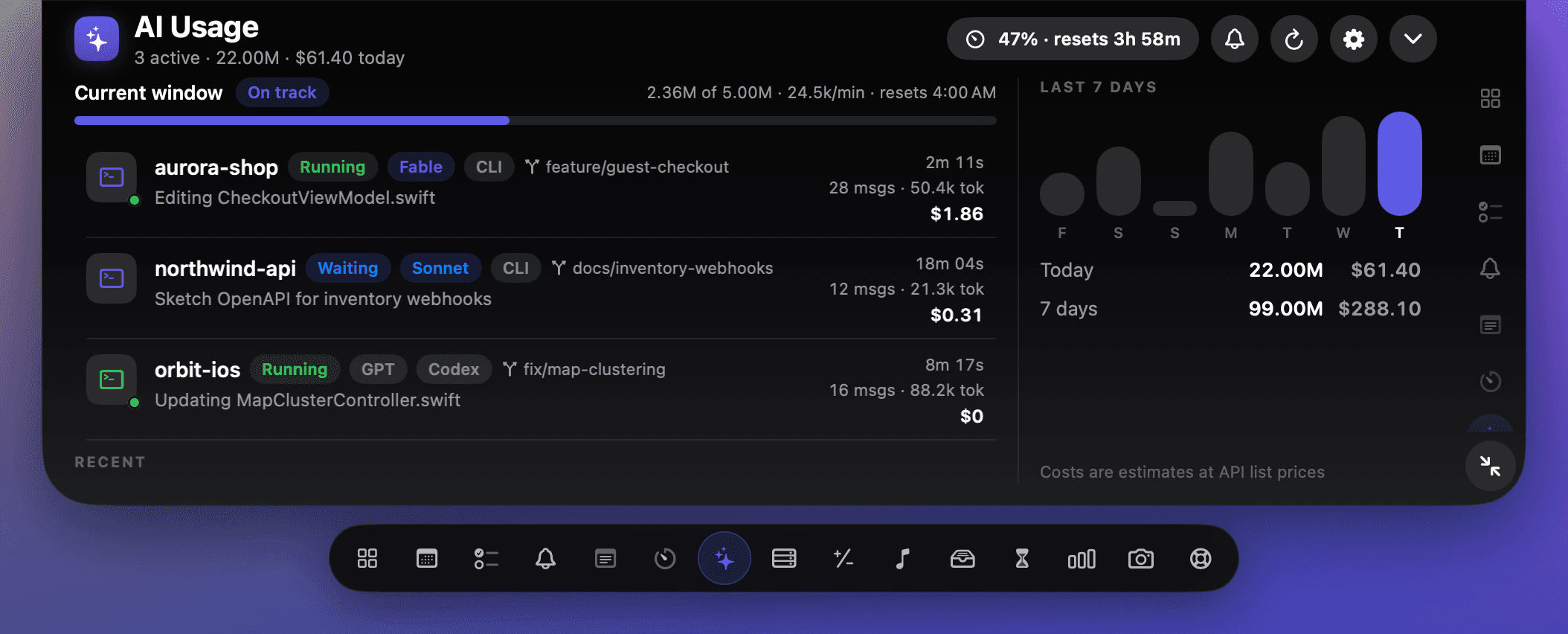
Same caveat as ccusage: it's an estimate from your Mac's logs, not Anthropic's meter, and nothing is uploaded. It pairs with approval alerts for Claude Code and with keeping your Mac awake while agents work, so a long task doesn't stall because the Mac went to sleep (for other jobs, see how to stop your Mac sleeping).
Which way of checking should you use?
| /usage | Settings → Usage | ccusage | NotchDodo | |
|---|---|---|---|---|
| Anthropic's real remaining allowance | Yes | Yes | No, an estimate | No, an estimate |
| Weekly limit and reset | Yes | Yes | No | No |
| Includes claude.ai and other devices | Plan bars yes, breakdown no | Yes | No | No |
| Tokens and estimated cost per session | Current session | No | Yes | Yes |
| Always visible | No | No | No | Yes, in the notch |
| Codex and Gemini CLI | No | No | Yes | Yes |
| Cost | Built in | Built in | Free, open source | $9.99 one-time |
For the number that decides whether you get blocked, use /usage or Settings → Usage. Use ccusage or NotchDodo to see where your tokens go and how fast a window is filling, so the limit doesn't surprise you.
How to make your usage last longer
These come from Anthropic's own guide to managing Claude Code costs, and they work the same way on a subscription:
- Clear between tasks.
/clearstarts fresh and costs nothing. Stale context is re-sent with every message. - Compact with intent.
/compact Focus on code changeskeeps what matters, but compacting a huge context is itself a large request, so don't compact when a clean start would do. - Match the model to the job. Anthropic suggests Sonnet for most coding and Opus for complex reasoning. Switch with
/model. - Lower the effort with
/effortfor simple tasks; thinking tokens count as output. - Trim fixed context. Keep
CLAUDE.mdshort, move specialised instructions into skills, and disable MCP servers you aren't using./contextshows what's taking space. - Be specific. "Add input validation to the login function in auth.ts" reads far fewer files than "improve this codebase".
- Watch background work. Loops, scheduled tasks, subagents and agent teams all use your allowance, even while you're idle. The
/usagebreakdown shows their share.
More guides
- Codex usage limits: how to check what's left and when it resets: How Codex usage limits work on ChatGPT Plus, Pro and Business: the 5-hour and weekly windows, how to check them with /status, and what to do when you hit one.
- Menu bar icons hidden behind the MacBook notch? 5 ways to get them back: Why Mac menu bar icons disappear behind the MacBook notch and 5 ways to get them back: Command-drag and Menu Bar settings, a spacing command, macOS 27's built-in button, Bartender or free managers like Ice and Thaw, and NotchDodo.
- Dynamic Island for Mac: how to get one on your MacBook in 2026: Does a Mac have a Dynamic Island? Only the new OLED MacBook Pro. Here's how to get one on any MacBook with a notch app: setup steps, free options and fixes.
- How to keep your MacBook awake with the lid closed (and when you shouldn't): Keep a MacBook awake with the lid closed: Apple's closed-display (clamshell) mode with an external monitor, pmset disablesleep, Amphetamine, why caffeinate can't do it, and the safer lid-open way to run Claude Code or scripts overnight.
- How to stop your Mac sleeping while a download or script runs: Four ways to keep a Mac awake until a download, backup or script finishes: a System Settings switch, the caffeinate command, free apps like Amphetamine, and NotchDodo. Plus what to do about the lid.
- Best notch apps for Mac in 2026: 8 apps compared: The best MacBook notch apps in 2026 compared on price, features and who each is for: NotchDodo, Droppy, Notchy, Boring Notch, Alcove, NotchNook, DynamicLake and Seam.
- Why is my Mac fan so loud? How to find the app and check CPU temperature: Find the app making your Mac fan loud with Activity Monitor or Terminal, check CPU temperature and fan speed on Apple silicon and Intel, and quiet it down.
- How to get notified when Claude Code needs your approval on Mac: Three ways to get an alert when Claude Code is waiting for permission or your next prompt on a Mac: the terminal bell, a Claude Code hook with a native macOS notification, and an alert in your MacBook notch.
- Claude Code usage tracker for Mac: See Claude Code tokens, estimated cost and your 5-hour window in the MacBook notch. Reads local logs, uploads nothing. Codex and Gemini CLI too.
- NotchNook alternative: NotchDodo vs NotchNook: An honest side-by-side of the two notch apps: tools, live activities, AI agent tracking, privacy and price.
- NotchDodo vs Boring Notch: What you get with the free, open source Boring Notch and what NotchDodo adds on top: calendar, Pomodoro, Claude Code alerts and more.
Sources
- Claude Help Center: Usage and length limits
- Claude Help Center: Use Claude Code with your Pro or Max plan
- Claude Help Center: What is the Pro plan?
- Claude Help Center: What is the Max plan?
- Claude Help Center: The Ultra plan
- Claude Help Center: Usage credits for paid Claude plans
- Claude Code docs: Manage costs effectively
- Claude Code docs: Error reference, usage limits
- Claude Code docs: Commands
- Claude Code docs: Interactive mode, wait for a usage limit to reset
- Claude Code docs: Status line, rate limit usage
- ccusage docs: Blocks reports and ccusage on GitHub
Claude and Claude Code are trademarks of Anthropic. ccusage belongs to its developers. Mac and MacBook are trademarks of Apple Inc. NotchDodo is an independent app and is not affiliated with Anthropic or Apple.