
At a glance: price, Macs and macOS
| App | Price | Macs | macOS | Best for |
|---|---|---|---|---|
| NotchDodo | $9.99 one-time | 2 | 14 Sonoma, Apple silicon | Getting work done |
| Droppy | $9.99 one-time, 3-day trial | 2 | 14 Sonoma | The most features for around $10 |
| Notchy | Free, optional donations | Any | 13 Ventura | The widest free feature set |
| Boring Notch | Free, open source (GPL-3.0) | Any | 14 Sonoma | Free, open source music and HUD |
| Alcove | $13.99 one-time, 72-hour trial | 3 | 15 Sequoia | Polished animations and HUDs |
| NotchNook | $15 lifetime or $2/month, 48-hour trial | 2 | 14.6 | The classic widget nook |
| DynamicLake Pro | $13.99 one-time | 3 | 14 | Cheap paid option with file conversion |
| Seam | $29 one-time, 48-hour trial | 2 | Not listed | Voice transcription in the notch |
1. NotchDodo (our pick)
- Price: $9.99 one-time, no subscription, 14-day refund
- Macs per licence: 2 · macOS: 14 Sonoma or later, Apple silicon
- Best for: People who want the notch to help them get work done
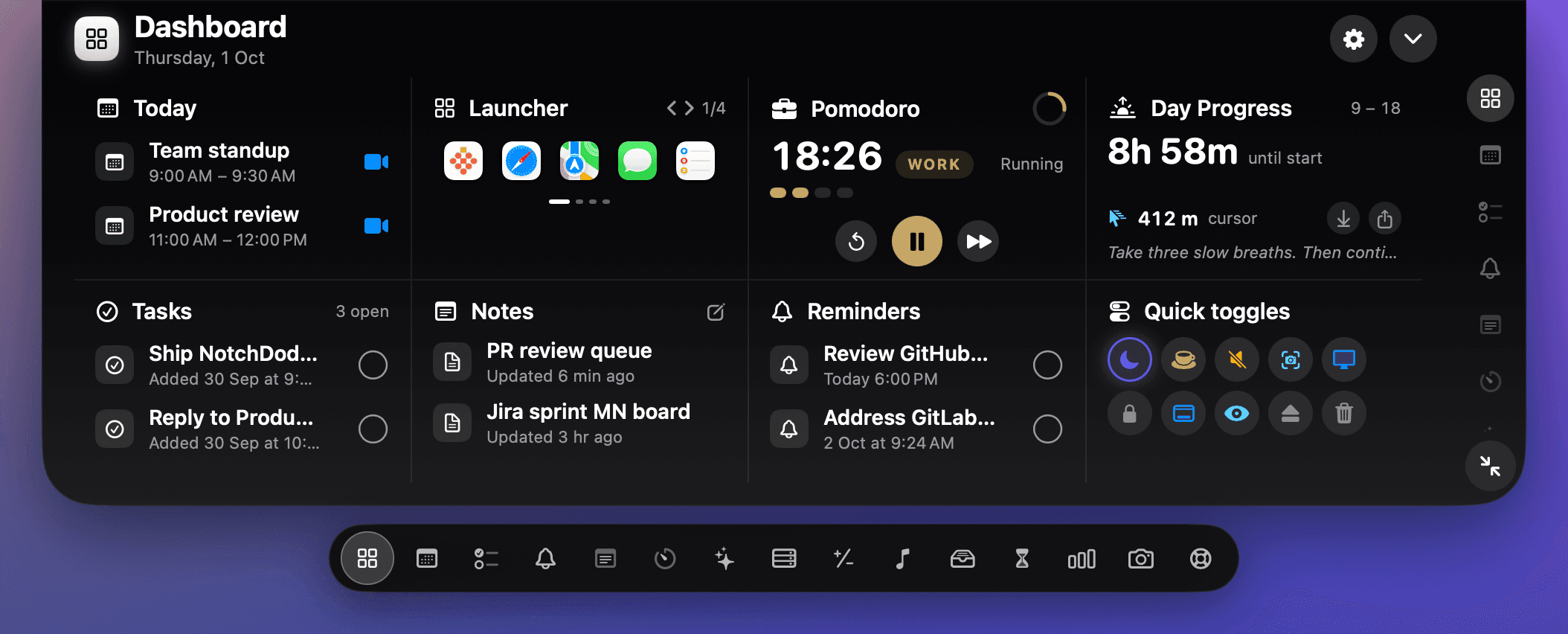
Most notch apps start with music and files. NotchDodo starts with your working day. Hover the notch and you get a dashboard: today's meetings with a Join button, tasks, notes, reminders, a Pomodoro timer, quick toggles like keep awake and dark mode, and a launcher. A dock along the bottom opens 18 tools, including a full clipboard manager, a file shelf with AirDrop, music, screen time, a calculator, a camera mirror and dev servers.
It drops down when something needs you
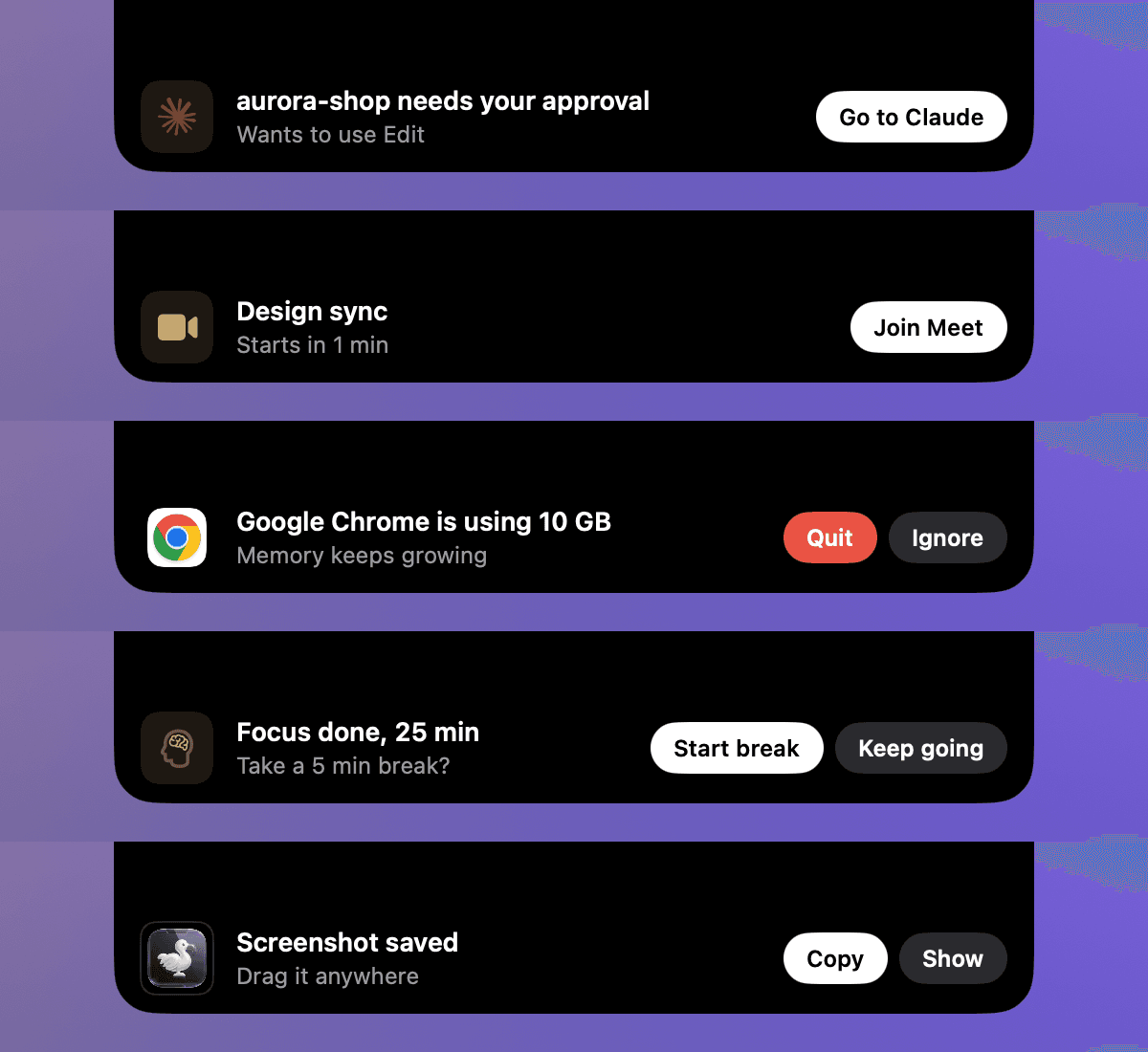
When Claude Code needs your approval, a meeting is about to start, an app is eating your CPU or a timer ends, the notch grows into a small banner with a button you can press right there: Go to Claude, Join, Quit, Restart. One banner at a time, it stays put while you hover, and it stays quiet in full screen and on calls.
Built for people who code with AI
NotchDodo tracks Claude Code, Codex and Gemini CLI usage from logs on your Mac: tokens, estimated cost and your Claude Code 5-hour window. Its System Stats tool shows the apps using the most CPU or memory, CPU temperature and fan speed, which we explain in our guide to a loud Mac fan.
What we like: the most complete set of work tools in a notch app, Claude Code approval alerts, banners with real buttons, everything stays on your Mac.
Watch out for: Apple silicon only, so Intel Macs should look at Boring Notch or NotchNook. It doesn't replace the volume and brightness pop-ups. It isn't notarised by Apple yet, so macOS asks you to confirm the first time you open it, and there's no free trial, though there is a 14-day refund.
2. Droppy
- Price: $9.99 one-time, 3-day trial
- Macs per licence: 2 · macOS: 14 Sonoma
- Best for: The most features for around $10
Droppy packs a lot into the notch through what it calls droplets: music with lyrics, a file tray, clipboard history, calendar, Pomodoro, system stats including temperature, and an AI agents droplet that shows usage limits for Claude, Codex and Cursor.
What we like: Huge feature list for the price, AI agent usage limits, Free iPhone companion app.
Watch out for: So many options that setup takes a while, Volume and brightness HUD not listed.
3. Notchy
- Price: Free, optional donations
- Macs per licence: Any · macOS: 13 Ventura
- Best for: The widest free feature set
Notchy is free and claims 74 features: music with synced lyrics, clipboard history, a file shelf, Pomodoro, calendar, HUDs, CPU and memory stats, a camera mirror and AI usage tracking for Claude Code, Copilot and Cursor. It also supports the oldest macOS on this list.
What we like: Free, Runs on macOS 13 Ventura, Works on Macs without a notch.
Watch out for: Breadth over depth: many small features, No paid support relationship.
4. Boring Notch
- Price: Free, open source (GPL-3.0)
- Macs per licence: Any · macOS: 14 Sonoma
- Best for: Free, open source music and HUD
Boring Notch is the best-known open source notch app, with over 11,000 GitHub stars. It's strongest on music, with a visualiser, and it replaces the volume, brightness and keyboard backlight pop-ups. It has a file shelf with AirDrop, calendar and a battery indicator.
What we like: Free and open source, Runs on Intel Macs too, Volume and brightness in the notch.
Watch out for: Latest builds are release candidates, Not notarised by Apple, No productivity tools like tasks or Pomodoro.
Boring Notch website · Compare in detail: NotchDodo vs Boring Notch, side by side
5. Alcove
- Price: $13.99 one-time, 72-hour trial
- Macs per licence: 3 · macOS: 15 Sequoia
- Best for: Polished animations and HUDs
Alcove focuses on feel: smooth animation, notifications, live activities, custom HUDs, lock-screen widgets and swipe gestures. It covers fewer tools than the apps above but does what it does with a lot of polish.
What we like: Very polished motion, 3 Macs per licence, 14-day refund window.
Watch out for: Needs macOS 15 Sequoia, File shelf, calendar and clipboard not listed.
6. NotchNook
- Price: $15 lifetime or $2/month, 48-hour trial
- Macs per licence: 2 · macOS: 14.6
- Best for: The classic widget nook
NotchNook set the pattern most notch apps follow: music, a file tray with AirDrop, calendar with meeting join buttons, notes, timers and a camera mirror.
Its situation is unusual. In September 2026 the original lo.cafe site and its Homebrew cask went offline. NotchNook is now sold again at getnotchnook.com, but we couldn't confirm who runs that site or whether older licences carry over, so check before you buy.
What we like: Mature, well-known design, 48-hour trial, no card needed, Runs on Intel Macs too, Monthly option if you don't want to buy outright.
Watch out for: Ownership and old licences unclear, No system stats or AI tools listed.
NotchNook website · Compare in detail: NotchNook alternative: NotchDodo vs NotchNook
7. DynamicLake Pro
- Price: $13.99 one-time
- Macs per licence: 3 · macOS: 14
- Best for: Cheap paid option with file conversion
DynamicLake covers music, calendar and meeting alerts, battery alerts, notifications, volume and brightness, a timer, weather and an AirDrop drop zone that can convert files. It also supports plugins.
What we like: Lifetime updates, 3 Macs per licence, File conversion in the drop zone.
Watch out for: Trial not listed, Clipboard and system stats not listed.
8. Seam
- Price: $29 one-time, 48-hour trial
- Macs per licence: 2 · macOS: Not listed
- Best for: Voice transcription in the notch
Seam's standout is local voice transcription and translation. It also has music, calendar, a focus timer, notifications, live activities, a volume and brightness HUD, drop zones, weather and a section for coding agents.
What we like: On-device transcription, Island mode for Macs without a notch, 14-day refund.
Watch out for: Most expensive on the list, Updates guaranteed for about a year.
Feature comparison
"Not listed" means we couldn't find the feature on the app's own site, not that it's definitely missing.
| NotchDodo | Droppy | Notchy | Boring Notch | Alcove | NotchNook | DynamicLake | Seam | |
|---|---|---|---|---|---|---|---|---|
| Music controls | Yes | Yes | Yes | Yes | Not listed | Yes | Yes | Yes |
| File shelf / AirDrop | Yes | Yes | Yes | Yes | Not listed | Yes | Yes | Yes |
| Calendar | Yes | Yes | Yes | Yes | Not listed | Yes | Yes | Yes |
| Clipboard history | Yes | Yes | Yes | Not listed | Not listed | Not listed | Not listed | Not listed |
| Pomodoro or timers | Yes | Yes | Yes | Not listed | Not listed | Yes | Yes | Yes |
| Tasks and notes | Yes | Not listed | Not listed | Not listed | Not listed | Yes | Not listed | Not listed |
| CPU temperature and fan | Both | Temperature | Not listed | Not listed | Not listed | Not listed | Not listed | Not listed |
| Claude Code usage | Yes | Yes | Yes | Not listed | Not listed | Not listed | Not listed | Coding agents |
| Claude Code approval alerts | Yes | Not listed | Not listed | Not listed | Not listed | Not listed | Not listed | Not listed |
| Drop-down alerts with buttons | Yes | Live activities | Live activities | Not listed | Live activities | Not listed | Notifications | Live activities |
| Volume / brightness HUD | No | Not listed | Yes | Yes | Yes | Not listed | Yes | Yes |
| Camera mirror | Yes | Not listed | Yes | Roadmap | Not listed | Yes | Not listed | Not listed |
Also worth knowing
- Atoll: a free, open source fork of Boring Notch that adds clipboard history and stats with CPU temperature. It needs a MacBook with a notch.
- MediaMate: about €8, replaces the volume, brightness and keyboard backlight pop-ups and shows what's playing. Good if that's all you want.
- TopNotch: free, from the CleanShot team. It hides the notch with a black menu bar instead of using it.
How to choose
- You want the notch to help you work: NotchDodo.
- You code with Claude Code: NotchDodo for approval alerts and usage; Droppy and Notchy also show usage limits.
- You don't want to pay: Notchy for features, Boring Notch for open source.
- You have an Intel Mac: Boring Notch for free, or NotchNook.
- You mostly want music and nicer volume pop-ups: Boring Notch, or MediaMate.
- You care most about animation: Alcove.
- You want to dictate and transcribe: Seam.
- You want the notch gone: TopNotch.
How we compared them
We took every price, licence, macOS requirement and feature from each app's own website, App Store page or GitHub repository on 19 October 2026, and linked them here. We didn't use features advertised only by resellers or reviews. Notch apps change quickly, so check the app's site before you buy. If something here is out of date, email support@notchdodo.com and we'll fix it.
More guides
- Why is my Mac fan so loud? How to find the app and check CPU temperature: Find the app making your Mac fan loud with Activity Monitor or Terminal, check CPU temperature and fan speed on Apple silicon and Intel, and quiet it down.
- How to get notified when Claude Code needs your approval on Mac: Three ways to get an alert when Claude Code is waiting for permission or your next prompt on a Mac: the terminal bell, a Claude Code hook with a native macOS notification, and an alert in your MacBook notch.
- Claude Code usage tracker for Mac: See Claude Code tokens, estimated cost and your 5-hour window in the MacBook notch. Reads local logs, uploads nothing. Codex and Gemini CLI too.
- NotchNook alternative: NotchDodo vs NotchNook: An honest side-by-side of the two notch apps: tools, live activities, AI agent tracking, privacy and price.
- NotchDodo vs Boring Notch: What you get with the free, open source Boring Notch and what NotchDodo adds on top: calendar, Pomodoro, Claude Code alerts and more.
Mac and MacBook are trademarks of Apple Inc. Other app names belong to their owners. NotchDodo is an independent app and is not affiliated with Apple or with any app listed here.