
Claude Code usage tracker
Your Claude Code limits, right in the notch.
Hitting the 5-hour limit mid-task, with no warning, is the worst part of working with an agent. NotchDodo shows you where you stand before it happens.
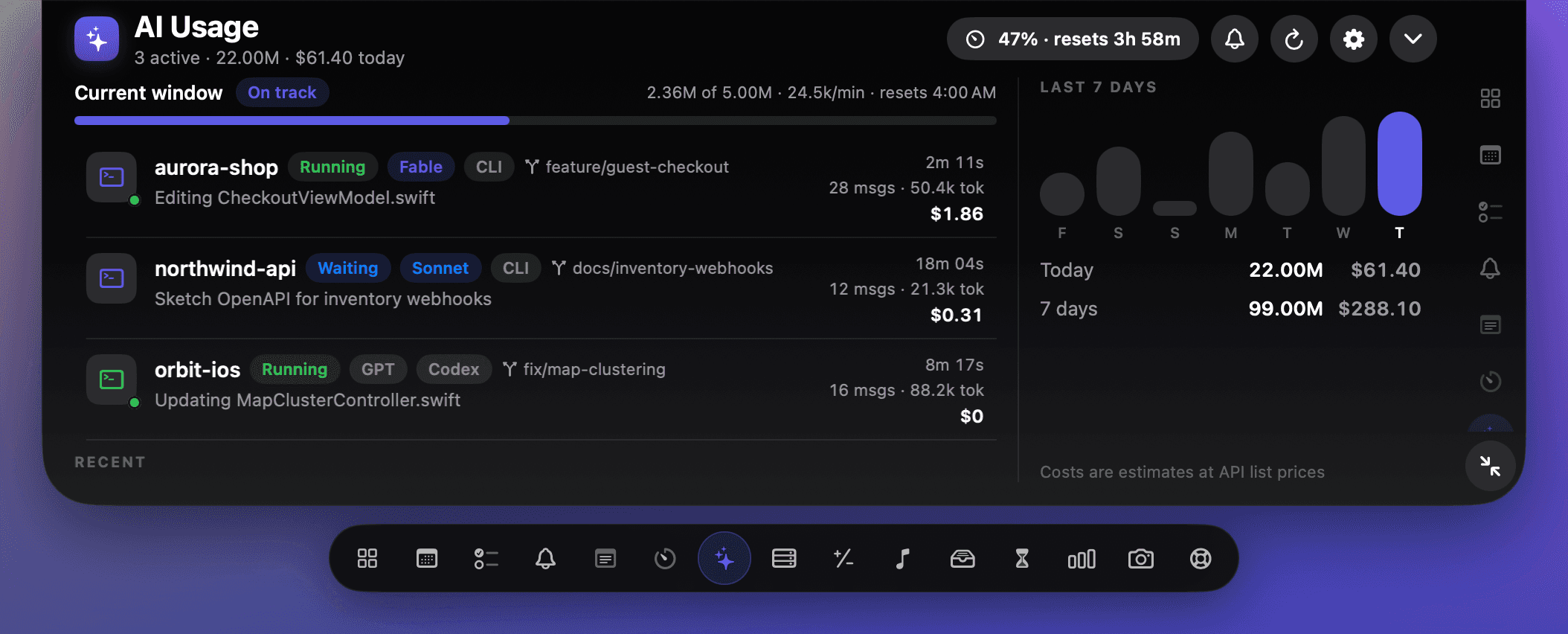
Demo data shown.
What you see
- Your current 5-hour window: tokens used against your budget, burn rate per minute and when it resets.
- Whether you are on track to finish the window or about to run out.
- Today's tokens and estimated cost, plus a seven day chart.
- Every session: project, git branch, model, messages, tokens and cost.
- Which agents are running right now, which are waiting for you, and which are done.
- A live activity beside the notch while an agent is working, so you see it without opening anything.
- A flash in the notch when your window crosses 80 and 100 percent.
- An alert with the Claude mark the moment Claude Code needs your approval or is waiting for you.
How it works
- 1It reads the logs Claude Code already keeps
Claude Code writes every session to a folder in your home directory. NotchDodo reads those files on your Mac as they change. There is no API key to paste and no account to connect.
- 2It groups your usage into 5-hour windows
A window starts at the hour of your first message and a new one begins after it ends, the same way the open source ccusage tool counts. That gives you tokens used, burn rate and a reset time.
- 3It compares you against a budget
NotchDodo learns a budget from your biggest past window, or uses one you set. From your burn rate it projects whether you will make it to the reset.
- 4It stays one hover away
Hover the notch and open AI Usage. While an agent is running, a small live activity sits beside the notch so you can glance at it without opening anything.
The numbers are estimates. Anthropic does not publish its exact limit counter, and costs use API list prices, which is not how Pro and Max plans are billed. They are accurate enough to plan your next hour, which is the point.
Questions
Does it send my code or prompts anywhere?
No. NotchDodo reads the log files Claude Code already writes on your Mac and does the maths locally. Nothing from those logs leaves your Mac.
Is the 5-hour window exactly what Anthropic uses?
It is an estimate. NotchDodo groups your usage into 5-hour windows the way the open source ccusage tool does, starting at the hour of your first message. Anthropic does not publish its exact counter, so treat the reset time and budget as a close guide rather than an official number.
Where does the token budget come from?
By default NotchDodo learns it from the largest window in your own history. You can also set your own number in Settings if you know your plan's limit.
I'm on a Pro or Max plan. Is the cost real?
Costs are estimates at Anthropic's API list prices. Subscription plans are not billed per token, so on Pro or Max the figure shows what the same usage would cost on the API. It is a useful measure of how hard you are pushing, not a bill.
Does it work with Codex CLI?
Yes. If you use OpenAI's Codex CLI, its sessions and tokens show up alongside Claude Code. Codex costs are not shown because its plan pricing is not published per token.
Can it tell me when Claude Code needs my input?
Yes. Turn on alerts with the bell in AI Usage and the notch flashes with the Claude mark when Claude Code wants you to approve something or is waiting for your next prompt. It clears by itself once you answer. It works through Claude Code's own hooks: one small entry in ~/.claude/settings.json, removed again when you turn alerts off.
Does it work with Gemini CLI?
Yes. Gemini CLI sessions show up with their tokens and an estimated cost at Google's API list prices. They count towards today's totals and the seven day chart, but not the 5-hour window, because Google doesn't limit usage that way.
What about Cursor?
Not yet, and not from logs. Cursor keeps your real token usage on its own servers, and the files on your Mac don't record it, so NotchDodo can't show accurate numbers for it.
Do I have to keep a terminal open?
No. NotchDodo reads the logs whenever they change, so the numbers are there whether or not a session is running. It speeds up while the AI Usage page is open.
What else does NotchDodo do?
AI Usage is one of seventeen tools in the notch, alongside your calendar with one-click meeting join, a Pomodoro timer, music controls, a file shelf, notes, tasks, reminders and more.
Stop finding out from an error message.
One-time $4.99 for 2 Macs. macOS 14 Sonoma or later on Apple silicon. Macs without a notch get a simulated one.